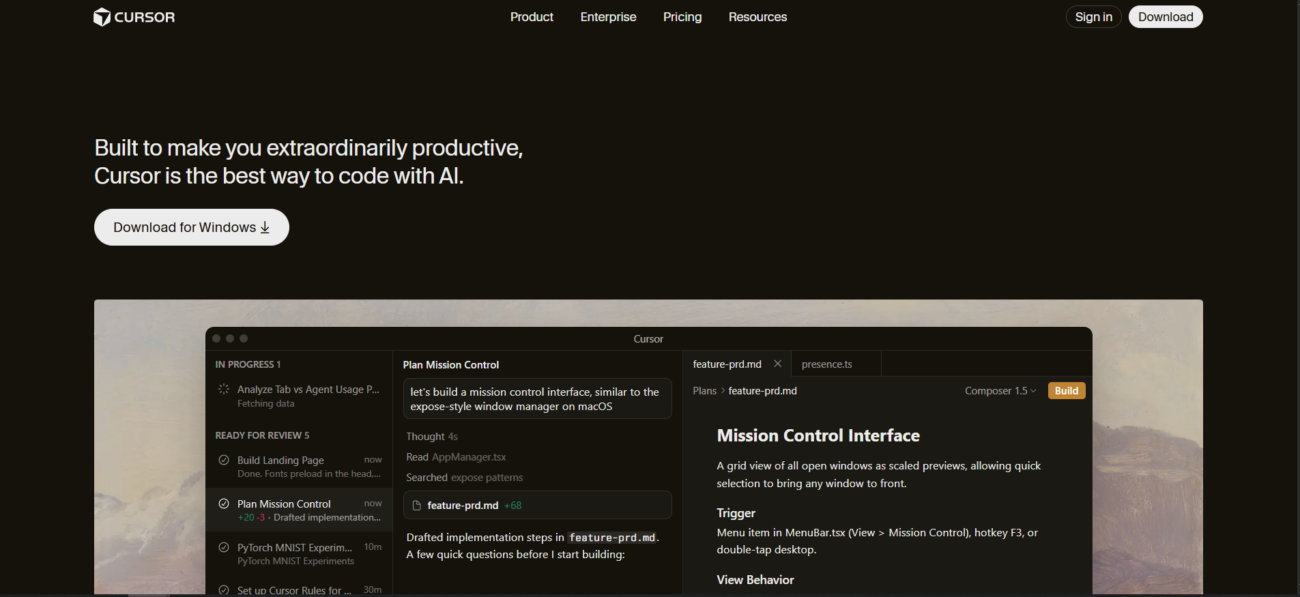
Cursor
Platforms:
API
Desktop
Mobile
Web
Integrations:
Discord
Google Workspace
Microsoft 365
Slack
Zapier

Cursor

Freemium
An advanced, AI-powered IDE built on VS Code that understands your entire codebase to generate code and fix bugs instantly.
No ratings yet
 | 0 reviews
Added: Mar 03, 2026
Updated: Mar 31, 2026

See Cursor in Action

About Cursor

What Is Cursor?

Cursor is an AI-first code editor, built as a fork of Visual Studio Code, that integrates large language models directly into the development environment. Unlike standard plugins, Cursor is designed from the ground up to index your entire codebase, allowing the AI to have full context of your project’s structure, files, and dependencies. In 2026, it features an advanced “Agent Mode” that can independently plan and execute complex, multi-file changes based on high-level natural language instructions.

Where You Can Use It

You can use Cursor as a standalone Desktop application for deep development work. It also provides a Web-based interface through its Cloud Agents, which allow users to interact with repositories and generate artifacts directly in a browser. For developers on the move, its Mobile Agent access enables users to troubleshoot issues or review code remotely. Furthermore, Cursor offers an API and supports the Model Context Protocol (MCP) to connect with external tools like Jira, Notion, and Slack.

What It’s Known For

Cursor is best known for its “Codebase Indexing,” which enables it to answer project-specific questions and provide “Tab-Tab-Tab” predictive completions that feel telepathic. It is highly regarded for its “Composer” feature, which allows users to build entire applications or features across multiple files simultaneously. Beyond pure coding, it has become a favorite for “Vibe Coding”—allowing developers and marketers alike to build custom automation scripts and PPC tools simply by describing what they need.

Features

AI Automation Workflows

AI automation workflows automate tasks across tools and apps, helping teams reduce manual work and scale faster.

AI Chatbots
AI Chatbots

AI chatbots answer questions, support customers, and automate conversations across websites, apps, and messaging platforms.

AI Code Tools
AI Code Tools

AI code tools help developers write, debug, and understand code faster across the development process.

AI Natural Language Processing

AI natural language processing helps software understand, analyze, and work with human language.

AI Team Collaboration

AI team collaboration tools support shared workspaces and structured teamwork around AI workflows.

AI Text Summarization

AI text summarization tools condense long text into clear, easy-to-read summaries.

Use Cases

Advertising

Advertising AI tools help:

  • create and optimize ad copy
  • generate visuals and creatives faster
  • improve targeting and campaign performance
  • reduce manual work in ad management

These tools streamline advertising workflows and help teams launch and optimize campaigns more efficiently.

View all tools for Advertising
App Creation

App creation AI tools help:

  • build apps faster with less code
  • generate app logic and UI components
  • automate repetitive development tasks
  • support rapid prototyping and testing

These tools simplify app development and help teams launch products faster.

View all tools for App Creation
Automation

Automation AI tools help:

  • automate repetitive tasks and workflows
  • connect apps and systems together
  • reduce manual work across operations
  • scale processes with minimal effort

These tools streamline operations and help teams work more efficiently.

View all tools for Automation
Development

Development AI tools help:

  • write, debug, and refactor code faster
  • understand existing codebases more easily
  • automate repetitive development tasks
  • improve productivity across the development lifecycle

These tools help teams build, test, and ship software more efficiently.

View all tools for Development
Startups

Startups AI tools help:

  • build and validate products faster
  • automate operations with small teams
  • support data-driven decisions
  • scale workflows efficiently

These tools help startups move faster and compete with limited resources.

View all tools for Startups
Website Creation

Website creation AI tools help:

  • build websites faster with less technical effort
  • generate layouts, pages, and content
  • customize design and structure easily
  • automate setup and publishing tasks

These tools help users launch and manage websites more efficiently.

View all tools for Website Creation

Pricing

Starter Plan
$0
Per Month

Features:

  • 2,000 Tab Completions per month (real-time ghost text).
  • 50 Premium Requests per month (Chat and basic Composer usage).
  • 2-week Pro Trial: Includes access to all advanced features for a limited time.
  • Basic Context: AI can see your open files but has limited “project-wide” search.
  • Privacy: Includes SOC 2 Type II certification, even on the free tier.
Pro Plan
$20
Per Month

Features:

  • Unlimited Tab Completions: Powered by a custom, lightning-fast model (similar to Supermaven).
  • Unlimited “Auto” Mode: Unlimited use of Cursor’s dynamic model routing, which chooses the best model for the task automatically.
  • $20 Monthly Credit Pool: Used only when you manually select “Frontier” models (like GPT-5.2 or Claude 3.7 Sonnet). This covers roughly 225-500 high-end requests.
  • Composer (Multi-file Editing): The standout feature that allows the AI to refactor code across 10+ files simultaneously.
  • Project-wide Context: The AI indexes your entire local codebase for pinpoint accuracy.
  • Pay-as-you-go: If you exceed your $20 credit, you can continue at API cost rather than being cut off.
Pro+ Plan
$60
Per Month

Features:

  • Everything in Pro, plus:
  • $70 Monthly Credit Pool: Roughly 3.5x more usage for frontier models than the standard Pro plan.
  • Background Agents: Deploy “Cloud Agents” that can run long-running tasks (like writing unit tests for your entire repo) in the background while you work on other files.
  • Extended Agent Usage: Higher limits for autonomous multi-step tasks.
  • Bugbot Access: Automatically scans your Pull Requests for logic errors and security flaws.
Would you recommend Cursor?

Leave a comment

arrow
Your rating:

Alternatives to Cursor

durable ai logo
Durable
No ratings yet
A powerful business-in-a-box for entrepreneurs that automates website creation, lead management, and…
Free + Paid
API
Desktop
Mobile
Web
View Tool
hotpot ai
Hotpot AI
No ratings yet
An all-in-one AI "creative helper" that specializes in image generation, photo restoration,…
Free + Paid
API
Desktop
Web
View Tool
d-id logo
D-ID
No ratings yet
A specialized creative studio for producing high-fidelity avatar videos and real-time conversational…
Paid Only
API
Desktop
Mobile
Web
View Tool
beautiful
Beautiful.ai
No ratings yet
A presentation platform built on design automation that allows teams to create…
Paid Only
API
Desktop
Mobile
Web
View Tool